
Displaying items by tag: symbol
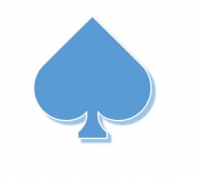
You want to type the symbol " spade " ( ♠ ), sign representing one of the four colors of playing cards and you do not know how to achieve it on your keyboard to integrate it into a document or a word processing tool or image like Word, Open Office or Photoshop?
To make the sign "spades" on your keyboard, simply perform the following key combination : Alt + 6 = ♠
In detail : Keep the Alt key (located to the left of the Space bar), then type the number 6 and finally release the Alt key, which will bring up the " spades " symbol: ♠
This symbol represents one of the 4 suits or "signs" of playing cards.
Do you want to know how to do the other colors of the cards on your keyboard ? Click on the following links:
- How to make the "club" symbol (♣) on the keyboard

You want to type the "woman" / "feminine" symbol (♀) on your keyboard, female sign with a circle and a cross going down and you do not know how to do it on your keyboard to embed in a document or a word or image processing tool like Word, Open Office or Photoshop?
The technique
To make the feminine sign on your keyboard, simply perform the following key combination:
Make the woman / female symbol : Alt + 1 2 = ♀
In detail : Keep the Alt key pressed (the key at the left of the Space bar), then type the numbers successively1 2, then you finally release the Alt key, which will bring up the " woman " symbol: ♀
This symbol originally represents the Goddess of love Venus and is still widely used today, for example to represent gender or sex on toilet doors in public places with the male symbol: ♂
To know how to make the "masculine" symbol ♂, click on the following link: How to make the "man" symbol (♀) on the keyboard